
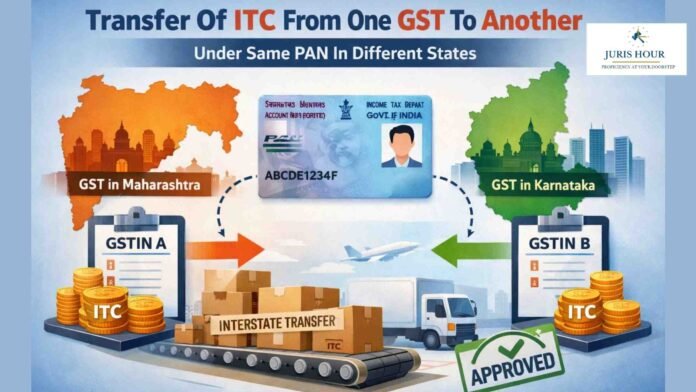
A person having multiple places of business in a State or Union territory may be granted separate registration for each place of business.
If a registered person, who has obtained separate registration for multiple places of business in a State/UT and intends to transfer unutilized matched Input Tax Credit (ITC) lying in his/her Electronic Credit Ledger of an existing entity (the transferor entity) to newly registered entities/place of businesses (transferee entity), then transferor entity (existing entity) has to file Form GST ITC-02A on GST Portal, within 30 days from obtaining such registration and transferee entity (newly registered entity) can accept or reject the same.
BUY NOW: E-Magazine: Top 100 GST ITC Judgements
Form GST ITC-02A: Meaning and Who Should Use It
Form GST ITC-02A is used by a registered taxpayer to transfer the unutilised balance of Input Tax Credit (ITC) from the principal place of business (transferor) to a newly registered branch (transferee) within the same State or Union Territory.
Such transfer must be carried out within 30 days from the date the new branch obtains GST registration. The amount of ITC transferred should be proportionate to the value of assets held at the new branch. While determining this ratio, all assets must be considered regardless of whether ITC was originally availed on them or not. The transfer is completed through the filing of Form GST ITC-02A by the transferor on the GST portal.
Purpose of Form GST ITC-02A
The purpose of Form ITC-02A is to facilitate the allocation of ITC between different registrations of the same entity within the same State or Union Territory, based on the distribution of assets. The mechanism is somewhat similar to the Input Service Distributor (ISD) system, although ITC-02A specifically deals with transfer linked to asset distribution when a new branch is created.
In many cases, before a branch is formally established, the head office or principal place of business purchases capital goods, inputs, or input services that are intended for use by that upcoming branch. Since the purchases are made by the head office, it may have already claimed the ITC on those goods or services.
However, because the actual use or consumption occurs at the branch, the ITC should ideally belong to that branch. Form GST ITC-02A enables the principal place of business to transfer the relevant unutilised ITC to the newly registered branch, ensuring that the credit is properly aligned with the location where the assets are used.
Format of Form GST ITC-02A explained
ITC-02A contains details of both the transferor and transferee such as GSTIN, legal name and trade name.
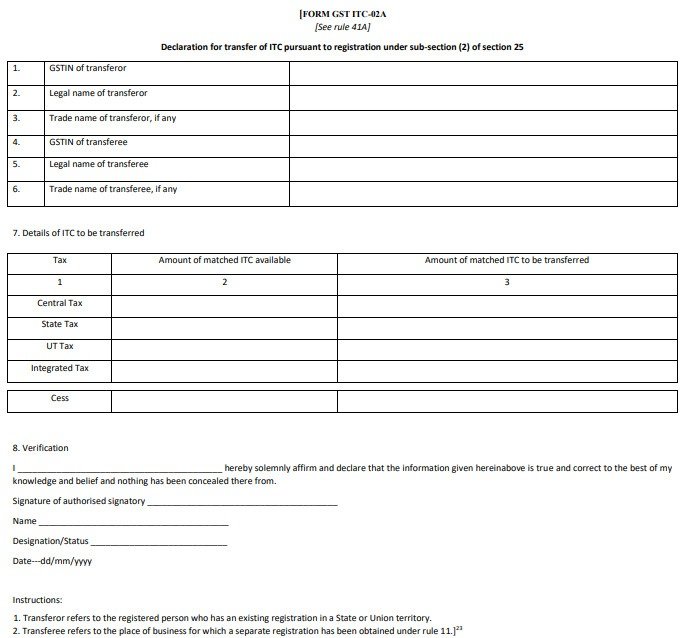
It also contains a table showing the details of ITC to be transferred, as given below:
- Tax/Cess: Values of tax/cess will have to be filled.
- Amount of matched ITC available: The amounts in this column are auto-populated.
Having unutilised balance in the Electronic Credit is not merely enough. The same should also be matched, i.e., the respective supplier should also upload the invoice details in GSTR-2A against which ITC is claimed.
The ITC rules allow the claim of ITC only to the extent of eligible ITC in GSTR-2B. Such ITC cannot be transferred.
- Amount of matched ITC to be transferred: The amount of ITC to be transferred must be calculated as per the ratio of the value of assets as mentioned earlier and then entered in this column.
How to file Form GST ITC-02A on the GST portal?
The transferor of ITC must follow the below steps.
Step 1: Log in to the GST portal with valid credentials and navigate to the ITC-02A page.
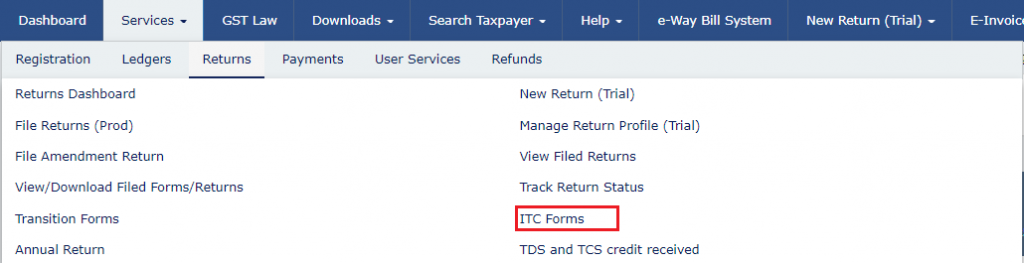
From the homepage, go to Services > Returns > ITC Forms
Click on ‘Transfer ITC’ on the ‘GST ITC-02A’ tile, as given below:
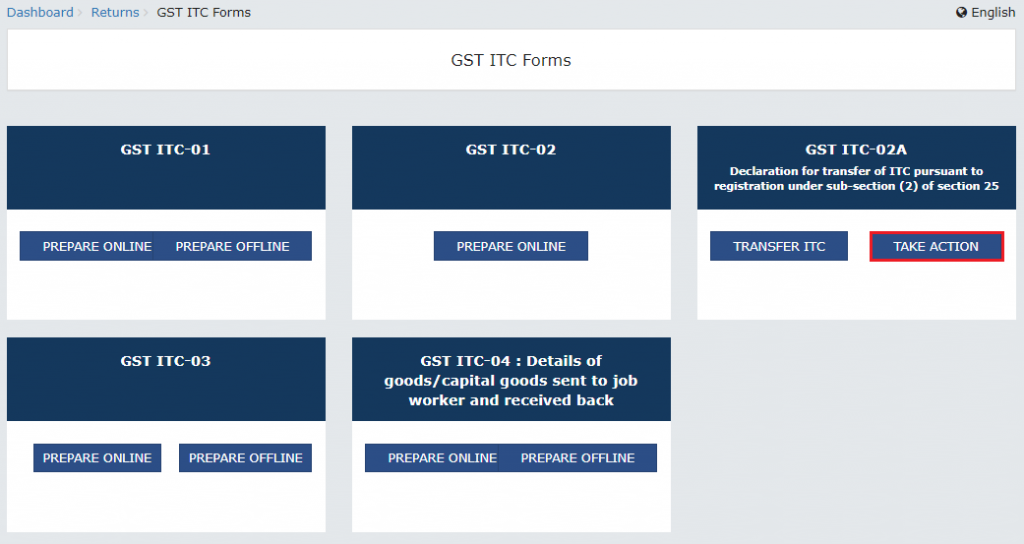
The page on ‘Declaration of transfer of ITC in case of obtaining separate registration within a State or Union Territory’ is displayed.
Step 2: Enter the necessary details of ITC to be transferred.
Enter the GSTIN of the transferee. It will auto-populate the ‘Transferee Legal Name’ and ‘Transferee Trade Name’. Enter the amounts in the ‘Amount of matched ITC to be transferred’ column and click on ‘Save’.
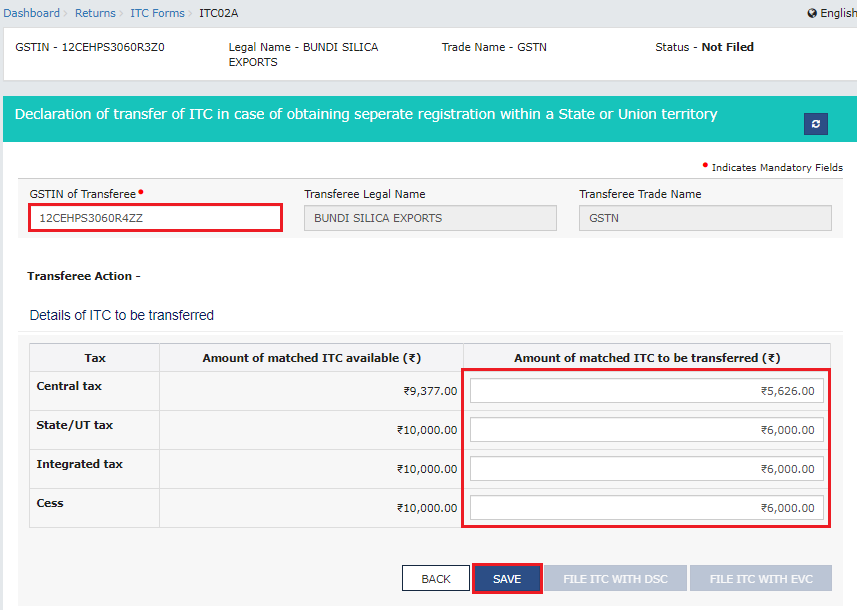
A confirmation message saying ‘Details saved successfully’ will be displayed.
Step 3: Preview form ITC-02A before filing.
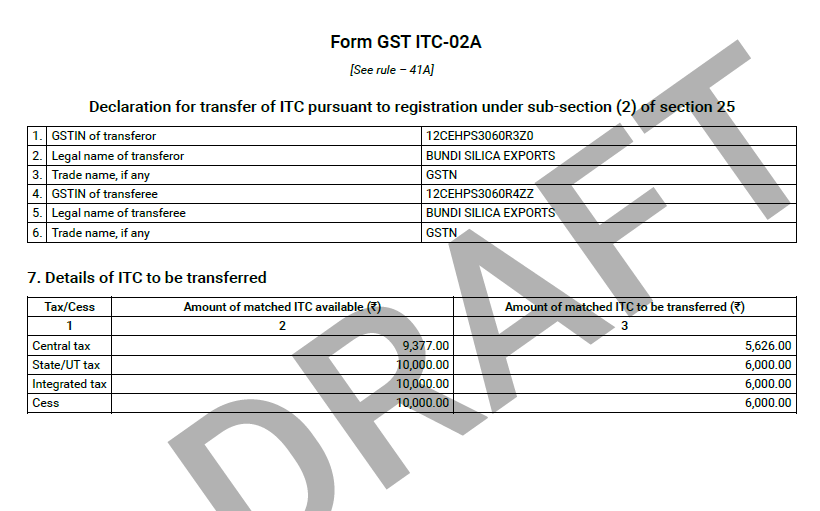
Click on the ‘Preview Draft GST ITC-02A (PDF)’ button to view the filled-up draft form.
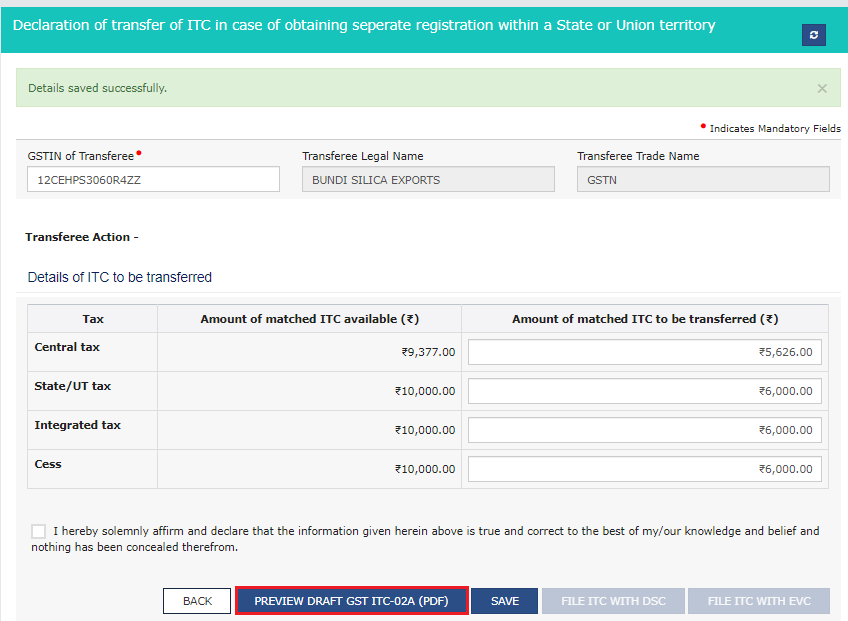
The summary page will be displayed as shown below.
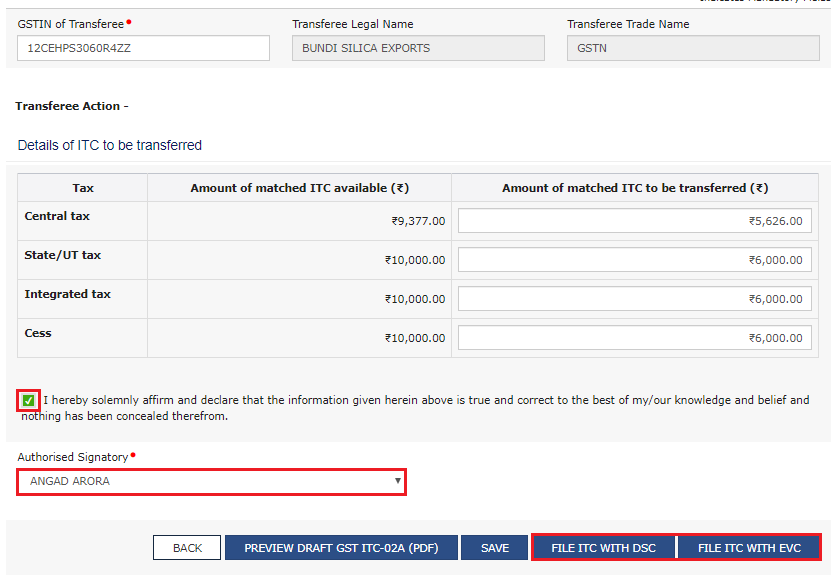
Step 4: File Form ITC-02A either using EVC or DSC.
Choose the declaration checkbox. Select the authorised signatory from the drop-down list and click on the ‘File ITC with EVC’ or the ‘File ITC with DSC’ button, whichever applicable.
If ‘File ITC with DSC’ button is selected, choose the digital signature and click on the ‘Sign’ button.
If ‘File ITC with EVC’ is selected, enter the OTP sent on the registered email address and mobile number.
A warning message will be displayed. Click on ‘Proceed’.
A message confirming successful submission appears along with the ARN. The filed form can also be downloaded in PDF format.
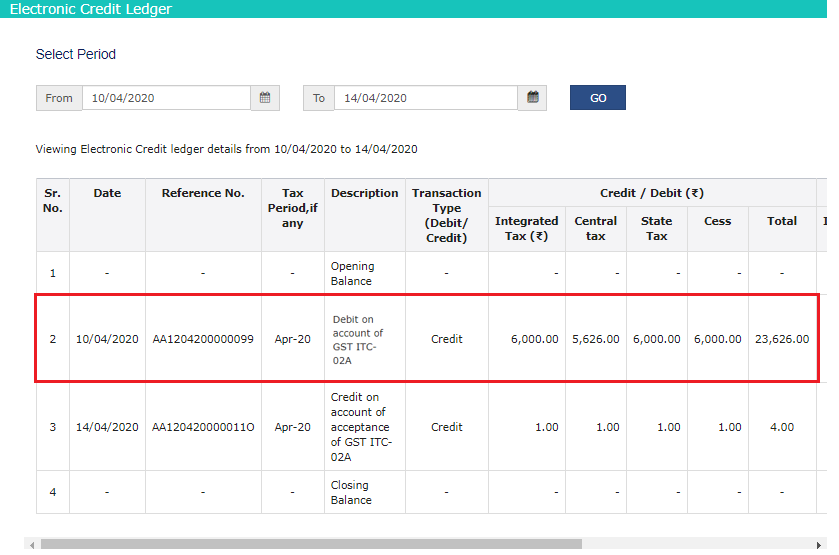
The Electronic Credit Ledger will be debited with the amount of transfer.
What should be done after filing Form GST ITC-02A?
Upon the successful filing of ITC-02A, an email and SMS notification will also be automatically sent to the transferee (branch). The branch can either accept or reject the transfer following the below steps.
Step 1: Log in to the GST portal with valid credentials.
From the homepage, Go to Services > Returns > ITC Forms
Step 2: Take action by either accepting or rejecting the ITC transferred to you after due verification.
Click on the ‘Take Action’ button under the ‘GST ITC-02A’ tile.
Choose the applicable ARN, that is pending for action. There is a complete list of ARNs displayed with status as ‘Accepted’, ‘Rejected’ or ‘Pending for Action’.
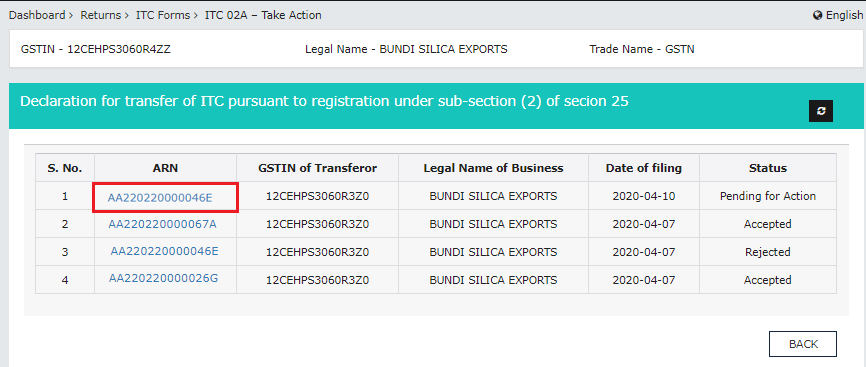
The following details must be verified by the transferee GSTIN:
- Transferor entity’s GSTIN/UIN, legal name and date of filing ITC-02A and ARN.
- Amount of matched ITC being transferred as entered by the transferor.
The transferee should verify the details provided and click on the ‘Accept’ button if they are in order. If they are not, click on the ‘Reject’ button.
If accepted, the confirmation message will be ‘You have successfully accepted declaration of transfer of ITC in GST ITC-02A. Kindly proceed for filing.’
If rejected, the confirmation message will be ‘You have rejected the declaration of transfer of ITC in GST ITC-02A. Kindly proceed for filing.’
Step 3: Submit the declaration for ITC transferred through ITC-02A
Select the declaration checkbox. Select the authorised signatory from the drop-down list and click on the ‘File ITC with EVC’ or the ‘File ITC with DSC’ button, whichever is applicable.
If the ‘File ITC with DSC’ button is selected, choose the digital signature and click on the ‘Sign’ button.
If ‘File ITC with EVC’ is selected, enter the OTP sent on the registered email address and mobile number. A warning message will be displayed. Click on ‘Proceed’.
The success message along with the ARN will be displayed. The filed form can also be downloaded in PDF format. The transferor will be notified of the response by email and SMS.
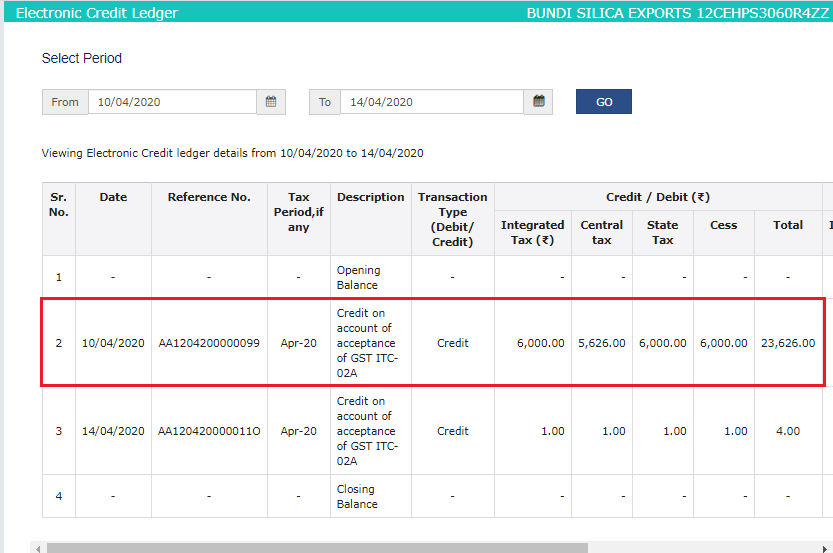
If Accepted:
The Electronic Credit Ledger of the transferee will be credited as shown below:
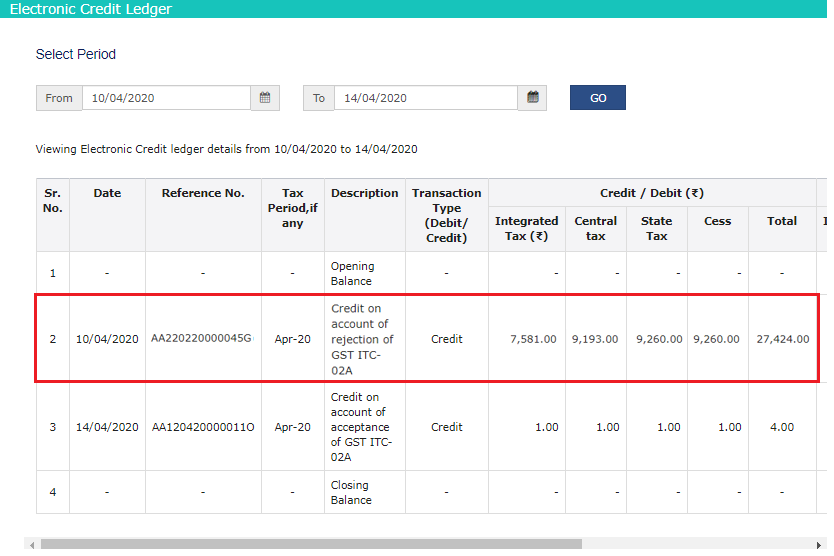
If Rejected:
The amount of ITC will not be transferred to the transferee and the same will be re-credited to the Electronic Credit Ledger of the transferor as follows:
Read More: JURISHOUR | TAX LAW DAILY BULLETIN : MARCH 14, 2026

